3D UI for Audio or VST Plugins
Today, it is possible to transform any project into 3D in seconds. For example, a special plugin has been developed that allows you to distort any shape and make fine adjustments with simple non-destructive controls. You can adjust the depth, height, and width of the perspective. The goal of this is to create a beautiful user interface that looks realistic. It’s really easy to use. And you can start using it in just a few minutes.
Using a 3D UI for audio or VST plugins is simple. It’s done to add a little visualization to a predominantly auditory and typographic landscape.
What is a 3D UI?
When talking about 3D UI for plugins, it should be noted that this is a form of human-machine interaction, which means users can move and interact in 3D space. Both humans and machines process data where the physical position of elements in three-dimensional space matters.
Benefits of a 3D UI
Let’s delve further into the benefits and examples of 3D UI for audio or VST plugins. There are several important advantages of 3D UI for VST:
Increased Visualization
The use of 3D UI for plugins offers unprecedented visualization capabilities. By enabling a three-dimensional representation of audio environments, users can gain insights into the spatial aspects of sound that were previously difficult or impossible to perceive in traditional two-dimensional interfaces. This visualization not only aids in the creative process but also helps to understand and control complex audio landscapes.
Improved User Experience
3D UI for audio or VST plugins significantly improves user experience by providing a more immersive and engaging environment. Users can interact with audio elements in a way that feels more natural and intuitive, reducing the learning curve and making the process more enjoyable. The depth and realism offered by 3D interfaces invite users to explore and experiment, fostering creativity and innovation.
Enhanced Interactivity
With 3D UI audio plugins, the level of interactivity is significantly enhanced. Users can manipulate audio elements directly within the 3D space, allowing for more precise adjustments and a tactile feel to digital audio manipulation. This increased interactivity by not only making the audio production process more efficient but also by being more satisfying for the user.
Examples of 3D UI for Audio or VST Plugins
We’re excited to share a few instances where we’ve showcased our expertise in creating 3D elements and implementing them in the UI for audio plugins.
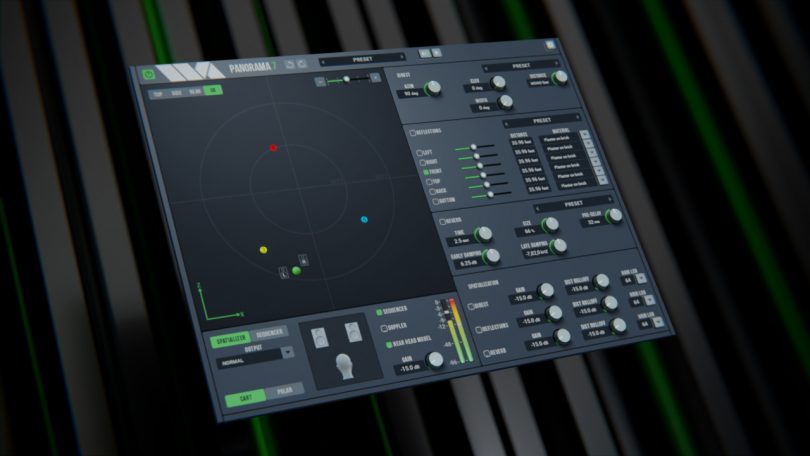
Wave Arts – Panorama 7
Wave Arts wanted to give their latest product series a facelift, so our job was to suggest a fresh take on Panorama 6. To maintain the style, we suggested a combination of flat elements with 3D controls. In the end, the plugin got a modern look with some powerful features!
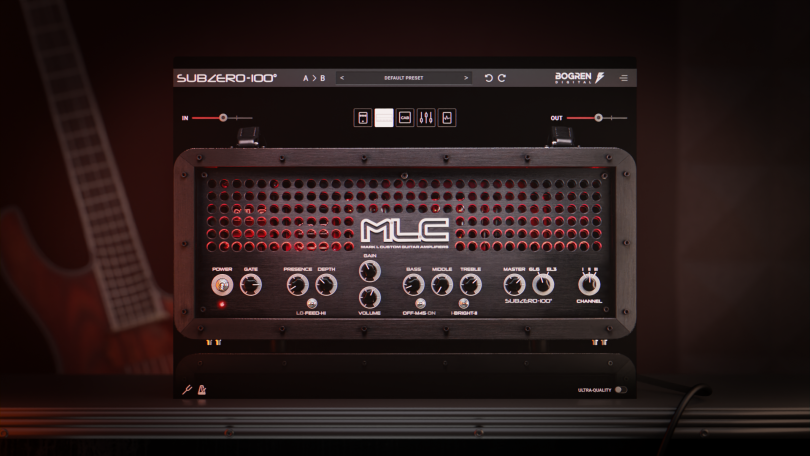
Bogren Digital – MLC Subzero 100
Entrusted with Bogren Digital’s vision, we aimed to seamlessly blend precision and design finesse, creating a product that would stand out in the world of guitar amp plugins. In the final part, we focused on 3D visualization. The MLC Subzero 100 came alive, every part detailed with care. Using advanced 3D graphics, we made sure the look went beyond what was expected.
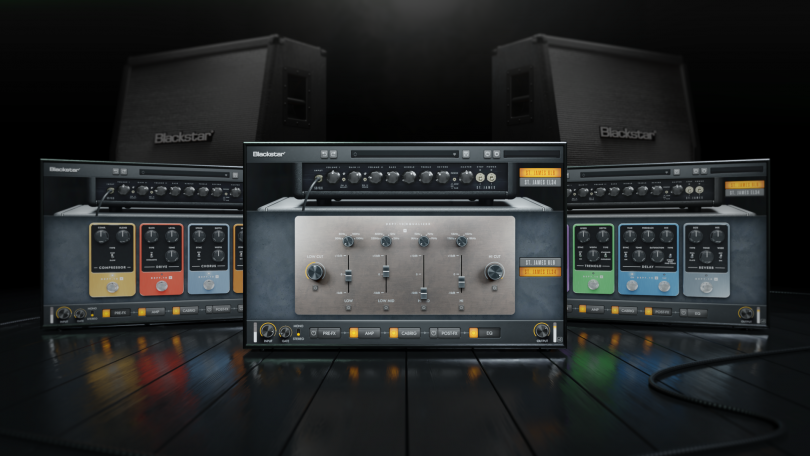
Blackstar Amps – St. James Plugin
This plugin is based on the high-end amp release, the St. James series. Eleven distinct cabinet models needed to be generated, each with two positions (left and right). Additionally, we crafted six microphone models, also with two positions, each having two individual angles of tilt toward the cabinets. All cabinet and microphone models were meticulously recreated to match the originals. And we designed individual icons for the selection menu of each of these items.
The Future of 3D UI in Audio Technology
The integration of 3D UI for plugins, particularly in the audio and VST plugin sectors, marks a significant evolution in how we interact with sound technology. With improved visualization, user experience, and interactivity, 3D UIs are setting new standards for audio production and design. As technology advances, we can expect to see even more innovative applications of 3D UIs that push the boundaries of what’s possible in audio software. The synergy between 3D UI kits for audio and the creative potential of users promises a future where the exploration of sound is not just about hearing but also about visual and tactile interaction, making audio production an even richer and more immersive experience.
FAQ
-
How easy is it to integrate a 3D UI into existing audio or VST plugin projects?
Integrating a 3D UI into existing projects is made surprisingly straightforward with modern tools and plugins designed for this purpose. Specialized software enables the distortion of shapes and fine adjustments in a non-destructive manner, allowing for easy customization of depth, height, and width. Most developers can start incorporating 3D UI elements into their projects within minutes, significantly enhancing the user interface without a steep learning curve.
-
Are there specific genres of music or audio production that benefit more from 3D UI?
While 3D UI offer universal benefits across various audio production and music genres by enhancing visualization and interaction, genres that involve complex spatial sound manipulation, like ambient, cinematic scores, or electronic music, might gain particularly from the depth and realism 3D UIs provide. Producers in these genres can utilize 3D visualization to better understand the spatial relationships in their soundscapes.
-
What are the technical requirements for running audio or VST plugins with 3D UI?
The technical requirements for running audio or VST plugins with 3D UIs generally include a modern computer with sufficient processing power, graphics capabilities, and RAM. Since 3D UIs can be more resource-intensive than traditional 2D interfaces, ensuring your system meets the plugin developer’s recommended specifications is crucial for optimal performance and user experience.
-
What are the benefits of using a 3D UI for your audio products?
Using a 3D UI for audio products significantly enhances user engagement and experience by offering a more intuitive and immersive interaction with the product. It enables unprecedented visualization capabilities, allowing users to understand and manipulate complex sound environments with ease. This improvement in user experience can lead to more innovative and creative outcomes, making audio products more appealing to both professionals and hobbyists.
-
How does a 3D UI impact the sales of your audio products?
Implementing a 3D UI in audio products can positively impact sales by setting your offerings apart from competitors, providing a cutting-edge user experience that is both visually appealing and functionally superior. The enhanced interaction and visualization capabilities can convert into better product reviews, increased word-of-mouth promotion, and a stronger brand reputation.